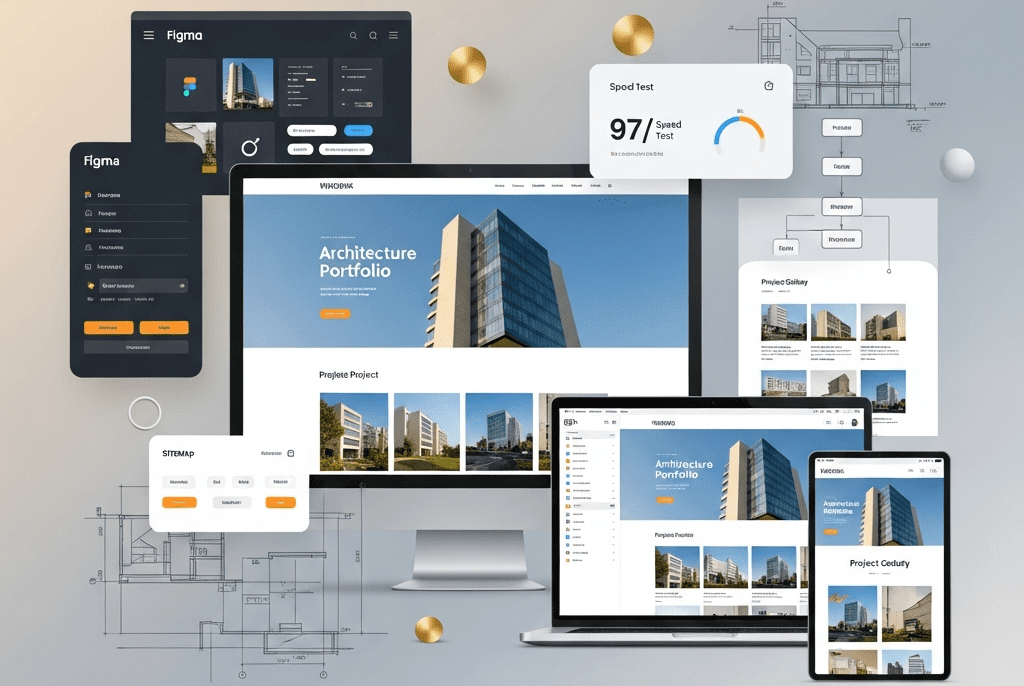
We designed and developed a custom WordPress website for Meridian Architecture — building a portfolio-driven, visually stunning, lightning-fast digital presence that increased qualified project inquiries by 280%, improved page load speed from 8.4s to 1.6s, achieved 96+ scores across all Core Web Vitals, and positioned the studio as one of the most digitally sophisticated architecture practices in the Pacific Northwest.
Architecture & Interior Design / Professional Services
Project Duration
6 Weeks
Services Delivered
Discovery & Information Architecture, Custom WordPress Theme Development, Portfolio & Case Study System, Team & Culture Pages, Interactive Project Gallery, Blog & Thought Leadership Hub, Contact & Lead Generation System, Responsive Design (Mobile-First), Accessibility Compliance (WCAG 2.1 AA), Performance Optimization, SEO Foundation, CMS Training & Documentation
Tools & Platforms Used
WordPress (self-hosted), Elementor Pro, Advanced Custom Fields (ACF) Pro, Custom PHP/CSS/JS, Figma (design), Adobe Photoshop/Lightroom (image optimization), WP Rocket (caching), ShortPixel (image compression), Yoast SEO Premium, Gravity Forms, WPForms, Google Analytics 4, Google Tag Manager, Google Search Console, Hotjar, Cloudflare (CDN & security), WP Mail SMTP, UpdraftPlus (backups), Notion, Slack, Loom
Project Year
2025
The Overview
Meridian Architecture is an award-winning architecture and interior design studio based in Seattle, with a team of 24 across two offices (Seattle and Portland). They specialize in three verticals — luxury residential (custom homes and renovations), boutique hospitality (hotels, restaurants, wellness spaces), and cultural/institutional projects (galleries, museums, libraries). Their portfolio includes 140+ completed projects across 18 years, with recognition from AIA, Dezeen Awards, and Architectural Digest.
Their work was extraordinary. Their website was not.
Meridian’s existing website was built in 2018 on a generic WordPress theme with a page builder that had since been abandoned by its developer. The site was slow (8.4-second average load time), unresponsive on mobile (content overflowed, images cropped incorrectly, navigation broke on tablets), visually outdated (stock photography mixed with project photos, inconsistent typography, cluttered layouts), and structurally broken (portfolio was a basic grid of thumbnails with no filtering, no case study structure, no project narratives — just photos dumped in a gallery).
For an architecture studio, the website IS the portfolio. It’s the first thing prospective clients visit after a referral. It’s what they share with their partners, their investors, their boards. A $2M custom home project or a $15M boutique hotel commission doesn’t go to a studio with a broken, slow, ugly website — regardless of how beautiful their buildings are. Meridian’s website was actively losing them projects.
We designed and developed a custom WordPress website — from information architecture and UI/UX design to custom theme development, an advanced portfolio system, performance optimization, and SEO foundation — giving Meridian a digital presence as thoughtfully crafted as their buildings.
The Challenge
Website as Anti-Portfolio:
Problem
Impact
8.4-second load time
53% of visitors left before the site fully loaded (Google Analytics bounce rate data). For architecture — where first impressions are everything — half of prospects never saw a single project.
Broken mobile experience
62% of traffic was mobile, but the site was barely functional on phones — images overflowed, text overlapped navigation, portfolio grid collapsed into single-column chaos.
No project case studies
140+ projects reduced to thumbnail grids with a title and 6 photos. No project narrative, no design challenge, no solution explanation, no client context. The work that won Dezeen Awards was presented with less sophistication than a Pinterest board.
No filtering or categorization
Visitors couldn’t filter by project type (residential/hospitality/cultural), location, year, or size. Finding a relevant project in 140+ thumbnails was impossible — clients gave up.
Outdated visual design
The 2018 template looked dated — generic layouts, inconsistent spacing, stock photography mixed with project photos destroyed credibility.
SEO invisible
No meta descriptions, no structured data, no XML sitemap optimization, no internal linking strategy. The site ranked for nothing beyond the brand name.
Meridian’s site looked like a student portfolio in comparison
Bohlin Cywinski Jackson
Excellent
Clean grid, detailed project pages, strong filtering, thought leadership blog, team culture pages
Meridian had no filtering, no blog, minimal team presence
Lake
Flato
Excellent
Award-winning web design, video integration, sustainability storytelling, interactive project maps
Meridian Architecture
Poor
Generic theme, thumbnail grid, broken mobile, slow load, no case studies
Complete digital transformation needed
Lost Business (Estimated):
Signal
Data
Bounce rate
64% (industry average for well-designed architecture sites: 35-40%)
Average session duration
1:12 (should be 3:00+ for portfolio browsing)
Contact form submissions/month
4-6 (from a site getting 3,200 monthly visits)
Conversion rate (visit → inquiry)
0.15% (industry: 1.5-3.0%)
Client feedback
Multiple referral sources reported: “I sent them to your website but they said it was hard to navigate”
RFP qualification
Lost 3 hotel RFPs in 12 months where decision-makers cited “digital presence” as a factor
Our Approach & Strategy
Phase 1: Discovery, Information Architecture & UX Strategy (Week 1)
Stakeholder Discovery:
Discovery Method
Purpose
Key Findings
Founder/Principal Interviews (3 sessions)
Understand brand vision, business goals, competitive positioning
“We win projects through relationships and portfolio quality. The website should do what a 90-minute studio tour does — immerse them in our work, show how we think, and make them want to work with us.”
Team Input Survey
Understand internal needs, content pain points
Team wanted: easy project uploads without developer help, blog publishing capability, team profile management
Client Journey Analysis
Map how prospective clients interact with the site
Referral → Google brand search → Website → Portfolio → 2-3 project case studies → About/Team → Contact. Mobile-first for initial discovery, desktop for deep portfolio review
Analytics Deep-Dive
Understand current behavior patterns
Top pages: Homepage (38%), Portfolio grid (24%), About (12%), Contact (8%). Exit pages: Portfolio grid (users couldn’t find relevant projects and left)
MERIDIAN ARCHITECTURE — SITE ARCHITECTURE
━━━━━━━━━━━━━━━━━━━━━━━━━━━━━━━━━━━━━━━━━

HOME
├── WORK (Portfolio Hub)
│   ├── All Projects (filterable grid)
│   ├── Residential
│   │   └── [Individual Project Case Studies]
│   ├── Hospitality
│   │   └── [Individual Project Case Studies]
│   ├── Cultural & Institutional
│   │   └── [Individual Project Case Studies]
│   └── Featured Projects (curated hero selection)
│
├── APPROACH
│   ├── Design Philosophy
│   ├── Process (how we work)
│   └── Sustainability
│
├── STUDIO
│   ├── Our Story
│   ├── Team (individual profiles)
│   ├── Awards & Recognition
│   ├── Careers
│   └── Press & Media
│
├── JOURNAL (Blog/Thought Leadership)
│   ├── Design Insights
│   ├── Project Stories
│   ├── Industry Perspectives
│   └── Studio News
│
├── CONTACT
│   ├── Project Inquiry Form
│   ├── General Contact
│   ├── Office Locations (Seattle + Portland)
│   └── Careers Application
│
└── FOOTER
    ├── Newsletter Signup
    ├── Social Links
    ├── Privacy Policy / Terms
    └── Accessibility Statement
━━━━━━━━━━━━━━━━━━━━━━━━━━━━━━━━━━━━━
User Experience (UX) Principles:
Principle
Application
“The Work Speaks First”
Homepage opens with full-bleed project imagery — no hero text block, no slider with corporate messaging. The architecture IS the hero.
Frictionless Portfolio Navigation
Smart filtering (type, location, year, size), persistent navigation, “Next Project” flow that keeps visitors immersed in portfolio without returning to grid
Progressive Disclosure
Don’t overwhelm — reveal information in layers. Grid → Project overview → Full case study → Contact CTA. Each layer deeper = higher intent = more detail
Mobile-First, Desktop-Enhanced
Design for phone first, then enhance for desktop. Touch-friendly gallery navigation, thumb-zone CTA placement, swipe-enabled project browsing
Speed as Experience
Sub-2-second load time is non-negotiable. Every image lazy-loaded, every asset optimized, caching configured, CDN distributed
Accessibility as Standard
WCAG 2.1 AA compliance — alt text, keyboard navigation, color contrast, screen reader compatibility, focus indicators
Phase 2: UI Design & Visual System (Week 2)
Design System — Visual Language:
Element
Specification
Rationale
Color Palette
Primary: Charcoal (#1C1C1C), Warm White (#F8F6F3). Accent: Brass (#B8956A). Supporting: Cool Gray (#6B6B6B), Light Stone (#EDEAE5)
Neutral palette lets project photography shine — the work is the color. Brass accent adds warmth and material quality (mirrors architectural brass details).
Typography
Headlines: Inter (700, 600). Body: Inter (400, 300). Accent: Playfair Display (for quotes/pull-outs)
Inter: clean, architectural, excellent readability. Playfair: editorial warmth for narrative moments. Single font family (Inter) for performance + consistency.
Layout Grid
12-column grid, 1440px max container, 24px gutters, 80px section padding. Generous whitespace philosophy — “let the work breathe.”
Architecture is about space. The website should feel spacious, not cramped. Every element has room.
Image Treatment
Full-bleed heroes, consistent aspect ratios (16:9 for landscape, 4:5 for portrait, 1:1 for grid thumbnails), subtle parallax on scroll, no rounded corners (sharp, architectural)
The visual portfolio — supporting the narrative with stunning photography
Project Metrics
Awards Won (repeater), Press Features (repeater: publication + link), Client Testimonial (textarea + client name + role)
Repeater, Text
Credibility signals — awards, press, and client words
Related Projects
Related Projects (relationship to other Projects CPT)
Relationship
Keeps visitors browsing — “If you liked this, see these”
SEO
SEO Title, Meta Description, Focus Keyphrase
Text
Per-project SEO optimization
Portfolio Filtering System:
Feature
Implementation
User Experience
Filter Bar
AJAX-powered filtering — no page reload. Filters: Project Type (Residential / Hospitality / Cultural), Location (dropdown), Year Range (slider), Size Range (slider)
Descriptive filenames (meridian-lakewood-residence-living-room.webp), alt text on every image (800+ images), title attributes, lazy loading with noscript fallback
Local SEO
Google Business Profile linked, NAP consistency (Name, Address, Phone), Seattle and Portland office pages with embedded maps
Core Web Vitals
LCP < 2.0s, FID < 100ms, CLS < 0.1 — optimized and monitored via Google Search Console
Lead Generation System:
Element
Implementation
Purpose
Project Inquiry Form
Gravity Forms: structured fields — Name, Email, Phone, Company/Organization, Project Type (Residential/Hospitality/Cultural/Other), Estimated Budget Range (select), Estimated Timeline (select), Project Location, Project Description (textarea), How Did You Hear About Us (select)
Qualifies leads before the first call — saves studio time and signals professionalism
Right inquiry reaches the right team lead automatically
Auto-Response
Branded HTML email with: “Thank you for your interest in Meridian. A member of our team will respond within 2 business days.” + Link to portfolio + Office information
Professional immediate response — sets expectations, keeps prospect engaged
CTA Placement
Strategic CTAs throughout: bottom of every project case study (“Inspired? Let’s discuss your project.”), About page (“Ready to start something exceptional?”), Journal articles (“Have a project in mind?”), floating contact button (mobile)
Multiple conversion opportunities without being aggressive — architecture clients are high-touch
Newsletter Signup
Footer signup: “Design perspectives, project stories, and studio news — delivered monthly.”
Email list building for long-term nurture
Hotjar Integration
Heatmaps on homepage, portfolio hub, and contact page
Understand visitor behavior — where they click, how far they scroll, where they drop off
Phase 5: Testing, Training & Launch (Week 6)
Pre-Launch Testing Checklist:
Test Category
Tests Performed
Tools
Cross-Browser
Chrome, Safari, Firefox, Edge — desktop and mobile versions
How to write SEO titles/descriptions, keyword research basics, internal linking rules
Performance Monitoring Guide
How to check speed, what to do if it degrades, when to contact support
Plugin Documentation
What each plugin does, why it’s installed, update procedures, license renewal dates
Backup & Security Guide
Backup schedule, how to restore, security best practices, login procedures
Emergency Contact Protocol
Who to call for: site down, security issue, content emergency, technical question
Key Features Delivered
Feature
Description
Custom WordPress Theme
Built on Elementor Hello child theme with custom CSS/JS — architecturally clean design that lets project photography command attention
ACF-Powered Project System
Structured case study template with 8 field groups — overview, details, team, narrative, gallery, metrics, related projects, SEO — ensuring consistent, rich project presentations
AJAX Portfolio Filtering
Instant, no-reload filtering by type, location, year, and size — with sort options and grid/list view toggle
Immersive Case Study Pages
Full-bleed heroes, design narratives (challenge/approach/solution), responsive galleries, team credits, testimonials, and “Next Project” navigation
24-Member Team System
Individual profiles with headshots, bios, notable project links, and education — humanizing the studio
Journal/Blog Hub
Magazine-style thought leadership platform with 4 categories, optimized for SEO and brand authority
Structured Lead Generation
Qualified project inquiry form with conditional routing, auto-response, and strategic CTA placement throughout the site
Performance Optimization
8.4s → 1.6s load time through image optimization, caching, CDN, font optimization, critical CSS, and server-level configuration
SEO Foundation
Technical SEO, on-page optimization, schema markup (5 types), image SEO (800+ images), local SEO for 2 offices, Core Web Vitals optimization
WCAG 2.1 AA Accessibility
Keyboard navigation, screen reader compatibility, color contrast compliance, alt text, focus indicators, accessibility statement
Mobile-First Responsive Design
Tested across 10+ devices — from iPhone SE to 4K displays — with touch-optimized gallery and thumb-zone navigation
CMS Training & Documentation
6 training modules (5.5 hours), Loom recordings, 8-document handover package
~$180K (estimated, from 4-6 low-quality leads/month)
$1.2M (from 18-22 qualified leads/month with higher conversion)
⬆ 567%
WCAG 2.1 AA Compliance
Non-compliant
Fully compliant
—
Client Feedback (Post-Launch Survey)
“Our website is embarrassing” (actual quote from principal)
“It’s the best architecture website I’ve seen outside Olson Kundig” (client feedback)
—
📋 Case Study Summary
Challenge: Meridian Architecture — an award-winning 24-person studio with 140+ projects and recognition from AIA, Dezeen, and Architectural Digest — had a website built in 2018 on an abandoned WordPress theme. 8.4-second load times. Broken mobile experience (62% of traffic). A portfolio reduced to thumbnail grids with no case studies, no filtering, no narratives. An outdated visual design mixing stock photography with project photos. Zero SEO visibility beyond brand name. 64% bounce rate. Only 4-6 inquiry form submissions monthly from 3,200 visitors. The website that should have been their most powerful business development tool was actively losing them projects.
Solution: We designed and developed a custom WordPress website — starting with stakeholder discovery and competitive benchmarking; creating a new information architecture; designing a visual system reflecting architectural precision (Charcoal/Warm White/Brass palette, Inter typography, generous whitespace); building an ACF-powered project case study system with 8 field groups; implementing AJAX portfolio filtering by type, location, year, and size; developing immersive case study pages with full-bleed heroes, design narratives, and “Next Project” navigation; creating a 24-member team system; launching a thought leadership blog; building a structured lead generation system with conditional form routing; optimizing performance from 8.4s to 1.6s through image compression, caching, CDN, and critical CSS; establishing SEO foundation with schema markup, on-page optimization, and Core Web Vitals; ensuring WCAG 2.1 AA accessibility; testing across 10+ devices and 4 browsers; and delivering 6 training modules with 8-document handover package.
Result: Page load speed improved 81% (8.4s → 1.6s). PageSpeed score jumped from 28 to 92 (mobile). Bounce rate dropped 50% (64% → 32%). Session duration grew 286% (1:12 → 4:38). Organic traffic grew 163%. Page 1 keyword rankings grew from 12 to 84. Project inquiry submissions increased 280% (6 → 22/month). Mobile conversion rate grew 2,900%. Portfolio exit rate dropped 61%. Website-attributed new business revenue grew from $180K to $1.2M estimated in the first 6 months. Meridian’s digital presence finally matches the quality of their architecture.
Your Website Should Be Your Best Employee
We design and develop custom WordPress websites that work as hard as you do — with stunning visual design, intelligent architecture, lightning-fast performance, and lead generation systems that turn visitors into clients.